
I wanted to build a desktop app. I wanted to write it in SvelteKit with Bun. I didn’t want Electron.
That sounds like a contradiction. Web tooling for desktop apps usually means Electron, or Tauri if you’re willing to learn Rust, or one of the newer frameworks that all make you choose between “write native code” and “ship 200MB for a hello world.” I didn’t want any of those trade-offs. I wanted to write pure SvelteKit, use Bun’s fast startup times, and have the result feel like a proper desktop application.
So I built a launcher instead.
The Problem With Existing Solutions
Electron bundles Chromium and Node.js into every app. It works, it’s proven, and GitHub Desktop and VS Code use it. It also means your notes app ships at 150-300MB and takes several seconds to cold-start. For a personal knowledge manager that should feel lightweight and instant, that’s wrong.
Tauri is the modern alternative, it uses the system webview and Rust for the native layer, which is dramatically smaller. But it requires Rust, it requires learning the Tauri bridge API, and it couples your frontend to the native layer in ways that make standard browser tooling awkward.
Wails is the Go equivalent of Tauri. Similar trade-offs.
These share a fundamental assumption: the web app needs to be wrapped inside a native shell that controls it. I wanted to question that assumption and just use normal TypeScript with full SvelteKit and access to Bun shell commands.
Bun is fast enough, so lets do things the simple way
Bun starts fast. Not just “fast for JavaScript” fast , but genuinely fast. A SvelteKit/Bun app can go from cold process to serving HTTP requests in under two seconds. That’s fast enough that you could start it on demand, from a native launcher, every time the user opens the app.
If the launcher is a small Go binary and the web app is a Bun process, the architecture looks like this:
┌─────────────────────────┐
│     Go Launcher         │
│  ~single binary, thin   │
│  process supervisor     │
└──────────┬──────────────┘
           │ spawns, reads stdout
           ▼
┌─────────────────────────┐
│    Bun/SvelteKit App    │
│  all business logic     │
│  standard web tooling   │
└──────────┬──────────────┘
           │ HTTP on localhost
           ▼
┌─────────────────────────┐
│  System Default Browser │
│  full devtools, no shim │
└─────────────────────────┘
The Go launcher is dumb on purpose. It spawns the Bun process, waits for a ready signal, opens the browser, and manages the process lifecycle. That’s it. No business logic, no file access, no HTTP calls of its own.
The SvelteKit app is a completely standard SvelteKit app. It runs in the browser. You can debug it with browser devtools. You can develop it with bun dev and a normal browser tab. The launcher is invisible during development.
The Auth Problem
Here’s where it gets interesting. If your app is running on localhost:47832, what stops another process, or another app using the same framework from talking to it?
On a typical desktop machine, probably nothing. Localhost is usually trusted. But “usually trusted” isn’t good enough if you’re building a framework that other apps will use. The wrong launcher connecting to the wrong app and sending a shutdown signal, or worse, sending commands that modify data, is a real failure mode. Remember this app uses BUN so the Bun app has all the power a normal user has.
This is the problem I spent the most time on. The solution has three parts.
Part 1: Build-Time UUID
Both the Go launcher and the SvelteKit app are compiled with a shared UUID, injected at build time:
The UUID comes from .env files but can generated fresh for each release build. It’s baked into both binaries. A launcher will only talk to the app it was built with. If two sheaflauncher apps are running on the same machine, their UUIDs don’t match and they can’t interfere with each other.
Part 2: Runtime Password
The UUID alone proves the launcher is the right launcher for this app. But it doesn’t prove the launcher started the Bun process, someone could race to start their own Bun process on the same port.
So the Go launcher also generates a cryptographically random one-time password on startup and passes it to the Bun process via an environment variable:
The Bun app reads this at startup. Until it receives the password, login is impossible – the endpoint returns 503. The password is never written to disk, never passed as a command-line argument (which would be visible in process lists), and is only valid for the lifetime of the process.
Part 3: Session Cookie
The login flow is a single HTTP GET:
GET /sheaflauncher-control?uuid=<build-time-uuid>&password=<runtime-password>
Both must be correct. If they are, the server creates a session, sets an httpOnly cookie, and redirects to /. All subsequent requests check the session cookie. The password is gone — it was a one-time bootstrap credential.
The session is an in-memory Set of UUIDs. It clears on restart. No database, no persistence.
The Launcher Control Endpoint
Rather than a dynamic route like /login/[uuid], the endpoint is a fixed path with the UUID as a query parameter:
GET  /sheafgate-control?uuid=xxx&password=xxx  → login, set cookie, redirect
POST /sheafgate-control?uuid=xxx               → heartbeat, returns uptime JSON
DELETE /sheafgate-control?uuid=xxx             → clean shutdown
The Go launcher uses all three. After login it polls the POST endpoint every 5 seconds. If the app crashes and stops responding, the launcher detects it after 3 consecutive failures. On exit it sends the DELETE before killing the process.
From the app side, the entire launcher-control implementation is a single file that re-exports from a library:
// src/routes/sheafgate-control/+server.ts
export { GET, POST, DELETE } from '$lib/sheafgate/launcherControl';
The SvelteKit Library
The auth logic lives in src/lib/sheafgate/ — a folder you copy into any SvelteKit app. The consuming app needs exactly three things beyond the library itself:
src/hooks.server.ts
import { createHandle } from '$lib/sheaflgate/hooks';
import { DEV_AUTH_BYPASS } from '$lib/config';

export const handle = createHandle({ devBypass: DEV_AUTH_BYPASS });
src/routes/sheafgate-control/+server.ts
export { GET, POST, DELETE } from '$lib/sheafgate/launcherControl';
src/lib/config.ts
export const DEV_AUTH_BYPASS = false; // set true for local dev only
That’s the entire integration. The createHandle factory returns a SvelteKit Handle that checks sessions on every request, exempts the launcher-control route and the /login fallback page, and optionally bypasses all auth in dev mode.
The DEV_AUTH_BYPASS flag is important. During development you want bun dev and browser devtools without the launcher involved. Setting it to true disables all auth. Setting it back to false and rebuilding restores full security. It’s an explicit source-level change — visible in diffs, catchable in CI — rather than an environment flag that could be accidentally left on.
The Ready Signal
The final piece is how Go knows Bun is ready. The SvelteKit hooks module outputs a single JSON line to stdout on startup:
// in src/lib/sheafgate/hooks.ts, runs on module load
console.log(JSON.stringify({ status: 'ready', port: getPort() }));
Go reads stdout line by line, looking for a line starting with { that parses as {"status":"ready"}. Everything else is logged but ignored. This gives a 30-second timeout before the launcher gives up and exits with an error.
The port comes from the --port flag Go passes when spawning Bun. Go picks a random free port in the 47000–48000 range (below the OS ephemeral range, above well-known ports), checks it’s available by attempting to bind, and passes it to Bun. The ready signal confirms Bun started cleanly on that port.
For App Authors
The whole point of the framework is that app authors don’t think about any of this. They write a standard SvelteKit app. They drop in the sheaflauncher library. They add three thin files. They run make dist and get a Go launcher and a Bun app (with a full build folder containing the minimized pages) that together behave like a native desktop application. I dont use Bun’s compile to produce a binary as that doesnt work particularly well with sveltekit.
The launcher is the only thing the user ever sees. Double-click, browser opens, app is there. No terminal, no Node, no visible Bun. The browser can be the system default, which means full devtools are always available without any setup.
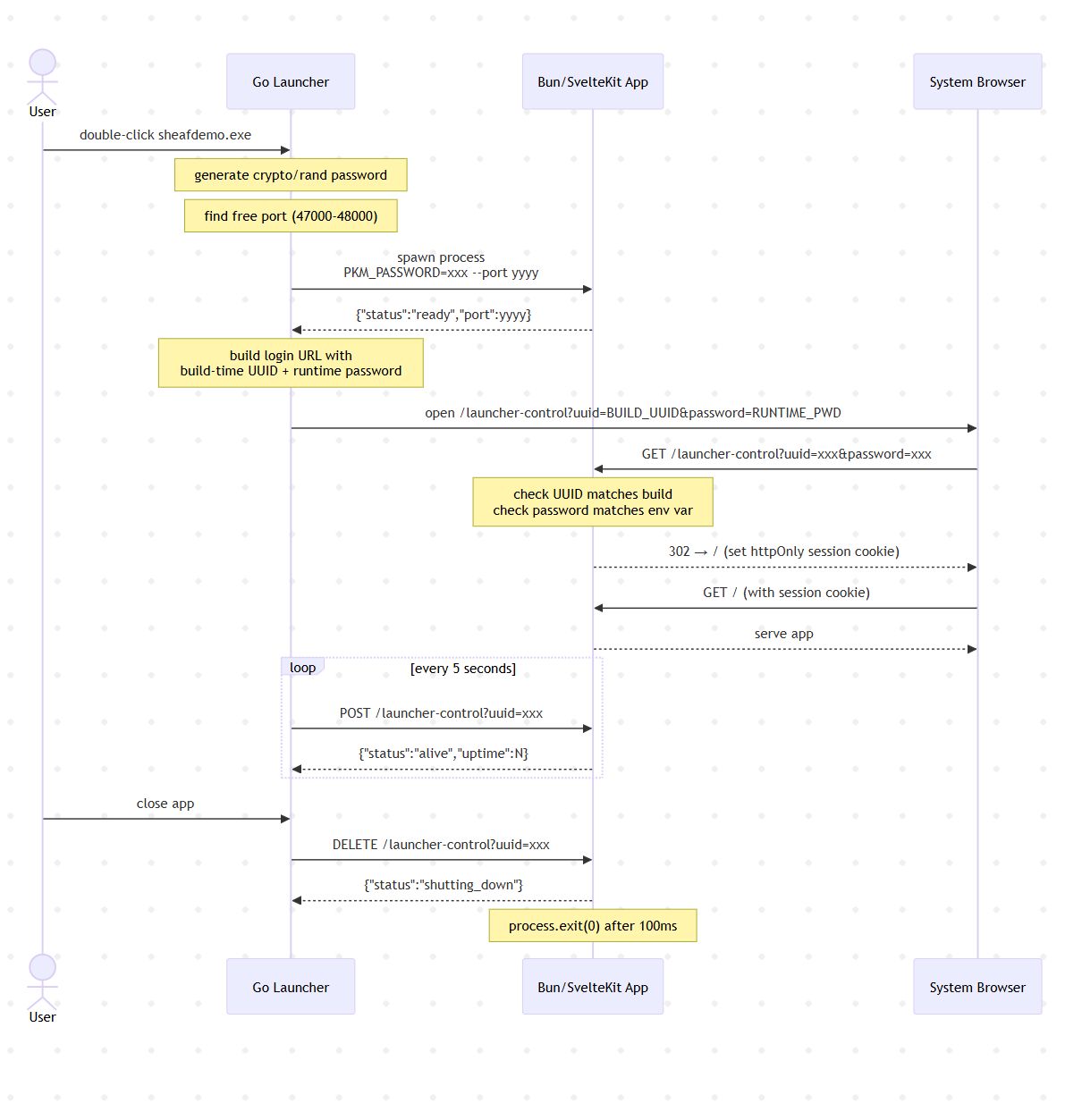
Authentication Flow: Sequence Diagram
The three-part auth handshake is easier to follow as a sequence. This shows the full flow from launcher startup to the user seeing the app:
Technical Details
Port selection — the launcher picks a random port in the 47000–48000 range by attempting to bind with net.Listen. The range sits above well-known service ports and below the OS ephemeral range (49152+), making collisions rare on a typical desktop machine. It tries up to 20 ports before giving up.
Password generation — crypto/rand reads 16 bytes and formats them as a UUID string. This gives 122 bits of entropy — enough that brute-forcing the endpoint on localhost within the login window is not a realistic attack.
The 503 window — between Bun starting and the password being read from the environment there is a small window where the /sheaflauncher-control endpoint returns 503. In practice this window is a few milliseconds. The launcher waits for the ready signal before opening the browser, so the user never sees it.
Session store — sessions are held in a Set<string> in process memory. There is no persistence layer. Restarting the Bun process invalidates all sessions, which is the correct behaviour — if the app restarts, the launcher re-authenticates automatically via the heartbeat failure and relaunch flow.
Heartbeat failure handling — three consecutive POST failures trigger launcher shutdown. The threshold is intentionally low: a process that has stopped responding to localhost HTTP in 15 seconds is not coming back.
Shutdown ordering — the DELETE request gives Bun 100ms to flush anything in flight before process.exit(0). The launcher then waits 500ms before force-killing the process. On a healthy machine the Bun process will have exited cleanly long before that deadline.
Why a fixed path, not a dynamic route — /sheafgate-control is a fixed path rather than /sheafgate-control/[uuid] for a deliberate reason. A dynamic route would appear in SvelteKit’s routing layer and could be accidentally matched by catch-all routes in complex apps. A fixed path with the UUID as a query parameter keeps the route unambiguous and easy to exempt in the session middleware.
What This Isn’t
This isn’t a replacement for Electron or Tauri in all cases. If you need:
- Native OS APIs With file dialogs, notifications, tray icons beyond what Bun can provide. This would mean you’ll need a richer native layer
- App store distribution then the launcher pattern doesn’t fit app store sandboxing models well
For a local-first personal tool where the user controls their machine, it’s a good fit. The browser is already installed, localhost is available, and Bun’s startup time is fast enough that the “native app” illusion holds.
The Code
SheafJournal, the personal knowledge manager built on this framework, is open source at github.com/robdeas/sheafjournal. but you also need to use its launcher to open it as an application and thats github.com/robdeas/sheafjournal. or set environment variables and use it in a browser.
But for developers wanting to use sheafgate there is a better way The sheaflauncher library has been extracted as a standalone demo package. The demo package contains all you will need to get started you just need to update the app name and the uuids in the settings file and replace the default svelte page with your own site. see github.com/robdeas/sheafgatedemo.
The Go launcher is about 250 lines. The SvelteKit library is four TypeScript files. The total framework overhead for a new app is six files and two build variables.