
January 6, 2026
I’m excited to announce the release of Music Timing Intro, an Android app designed to help children (and anyone else!) learn musical rhythm and note timing through hands-on practice. Source and built APK is available on my github. https://github.com/robdeas/musical_note_timing_player
The Genesis
This app evolved from a simple musical quiz I built for my son when he was learning to read music. I noticed he understood the concept of note duration but struggled with the feel of timing. Reading that a whole note lasts four beats is one thing—actually holding a note for exactly that long is another skill entirely.
Traditional music education often separates theory from practice, but timing is inherently practical. You can’t learn it just by reading about it; you need to feel it. That insight drove the design of Music Timing Intro.
How It Works
The app presents a simple but effective learning flow:
- See the note – Visual representation of whole, half, or quarter notes
- Watch the metronome – An animated pendulum keeps perfect time at 60 BPM
- Play it yourself – Press and hold a piano key for the correct duration
- Get instant feedback – The app tells you exactly how close you were
The piano keyboard synthesizes audio in real-time using Android’s AudioTrack API, generating sine wave tones at proper musical frequencies (A3 through G4). The timing validation uses a tolerance window to account for human variability while still encouraging accuracy.
Screenshots
Here’s what the learning experience looks like in practice:
The Four Moods: Simple, Encouraging Feedback
The app uses a straightforward emotional feedback system designed for primary school children. It doesn’t dwell on past mistakes—it only cares about your current streak:
- Sad: One wrong answer
- Angry: Two or more wrong answers in a row
- Happy: One correct answer
- Delighted: Two or more correct answers in a row
This means you can have a low overall score but still see “Delighted” after getting two right—because recent success matters more than past struggles.
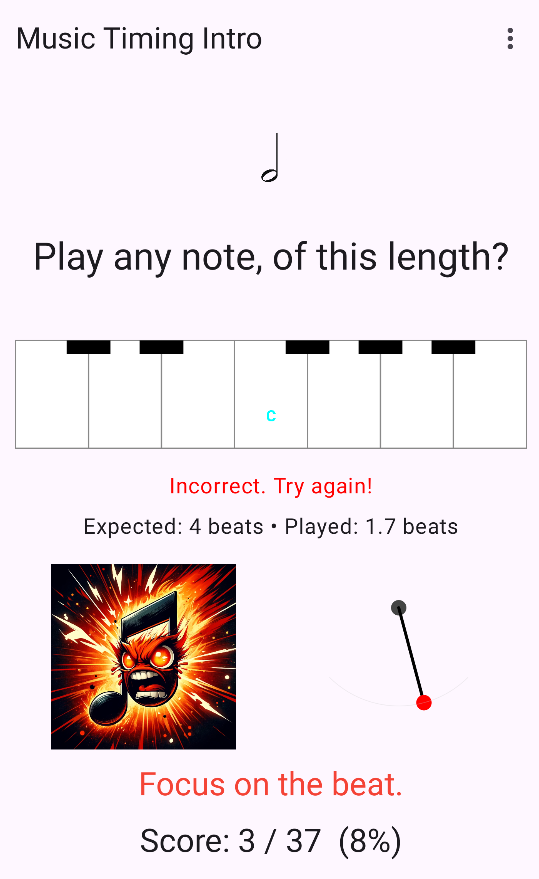 “Focus on the beat.” – Two wrong in a row. The feedback shows the gap (1.7 beats vs 4 expected), but the mood is about the streak, not the precision.
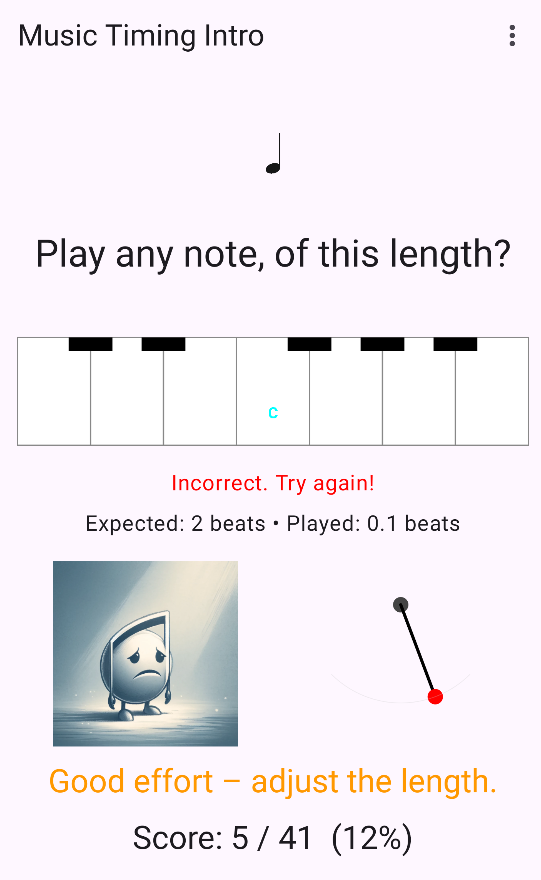 “Good effort – adjust the length.” – One wrong answer. Very close (0.1 vs 2 beats), but accuracy doesn’t matter—the system cares about right vs wrong.
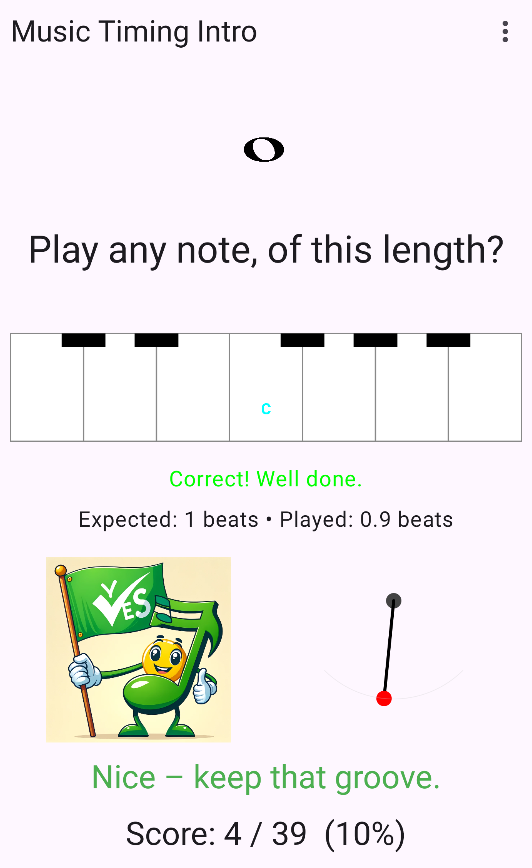 “Nice – keep that groove.” – One correct answer breaks the losing streak! Back to positive mood immediately.
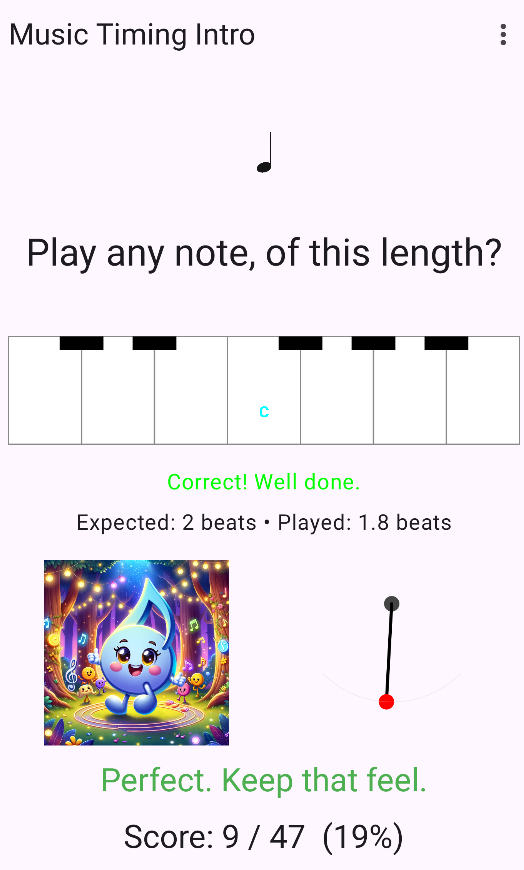 “Perfect. Keep that feel.” – Two right in a row, even with a low overall score (10%). Notice the metronome pendulum mid-swing—always keeping time.
Key Features Visible:
- The Metronome: Always visible and moving—providing constant visual timing reference
- Piano Keyboard: 7 white keys with Middle C labeled in cyan, plus black key stubs
- Clear Instructions: “Play any note, of this length?”
- Precise Feedback: Shows expected beats vs actual played beats for learning
- Encouraging Messages: Different phrases for each mood to avoid repetition
- Score Tracking: Always visible to show overall progress
- Note Display: Clear visual of whole, half, or quarter notes
Why This System Works for Children:
Short memory, immediate feedback: Children don’t need complex scoring algorithms. They need to know: “Did I just get it right?” The streak-based system is:
- Simple: Easy to understand (one right = happy, two right = delighted)
- Forgiving: Past mistakes don’t haunt you—just get the next one right
- Encouraging: Success is immediately celebrated
- Motivating: Two in a row feels achievable, not overwhelming
The precision feedback (“Expected: 2 beats • Played: 1.8 beats”) is there for learning, but the emotional feedback is binary: right or wrong, based on the tolerance window. This separation keeps the emotional response simple while still providing detailed information for improvement.
You can see this philosophy in the “Delighted” screenshot—despite only a 10% overall success rate, getting two consecutive answers right earns full celebration. That’s by design. We’re building confidence, not perfectionism.
Why 60 BPM?
Initially, I tried 120 BPM, thinking it would be more engaging. User testing (with my son) quickly revealed the problem: it was too fast for beginners.
At 120 BPM, quarter notes last only half a second. Children struggled to process what they saw, react to press the key, hold it for the right duration, and release at the right time—all in 0.5 seconds. Too much cognitive and motor load.
Switching to 60 BPM changed everything:
- Quarter note = 1 second (manageable reaction time)
- Half note = 2 seconds (easy to feel and hold)
- Whole note = 4 seconds (tests patience but achievable)
The key insight: Learning timing isn’t about speed—it’s about feeling the duration. 60 BPM gives space to experience the beat without rushing.
Yes, it can feel sluggish to experienced musicians. But this app isn’t for them. It’s for children taking their first steps into rhythm, where patience and accuracy matter more than tempo.
Educational Philosophy: Three Design Principles
1. Immediate Feedback Loop
Research shows immediate feedback accelerates skill acquisition. There’s no “submit” button for timing exercises—as soon as you release the key, you see results. This reduces cognitive load and keeps students in a flow state.
2. Multi-Modal Learning
The app engages multiple senses:
- Visual: Note image + metronome animation
- Auditory: Synthesized tone
- Kinesthetic: Physical key press and hold
Different learners engage different senses, and combining them reinforces the learning.
3. Positive Reinforcement
The mood system progresses from Bored → Happy → Delighted for correct answers, with encouraging phrases like “Spot on – lovely timing” or “Nice – keep that groove.” Even incorrect feedback is supportive: “Close – hold it just the right amount.”
This builds a growth mindset rather than performance anxiety.
The 12-Key Insight: Why One Octave Is Perfect
When I started building this app, I worried that one octave wouldn’t be enough. Surely students need access to more notes?
Music education research disagrees.
The app currently uses 7 white keys (A3 through G4, centered on Middle C). Future versions will enable the 5 black keys, creating a complete 12-key chromatic octave. This might seem limited, but it’s actually pedagogically superior:
What you can learn with just 12 keys:
- All 12 chromatic notes (sharps and flats)
- Every major and minor scale (starting positions)
- Basic intervals (minor 2nd through octave)
- Chord construction (triads)
- Key signatures and accidentals
- Hundreds of simple melodies
The pedagogical insight: Mastery at one octave transfers instantly to all octaves. The patterns are identical. Once students understand the relationship between C and C#, they understand all half-step relationships.
Physical instrument comparison:
- Melodicas for beginners: often 1 octave
- Recorders: ~1.5 octaves (but beginners use far less)
- Music Timing Intro: 12 keys = one complete chromatic octave
By keeping the keyboard to one octave, every key is large and touch-friendly. Children can play accurately without frustration. More keys would mean smaller targets and more errors.
One octave isn’t a limitation—it’s a deliberate design choice that prioritizes deep learning over superficial coverage.
The Surprising Market Gap
When I researched existing piano apps, I found dozens of options, but none doing what seemed obvious:
- Most apps offer 88 scrollable keys (overwhelming for beginners)
- Song-following games focus on entertainment over fundamentals
- Apps with “adjustable keyboards” show arbitrary key ranges
What I didn’t find: An app designed around the principle that one chromatic octave is all a beginner needs.
It’s surprising this gap exists—the design seems perfect for phone screens and beginner education. But there’s a reason commercial apps don’t do this, and it reveals something important about the difference between commercial software and educational tools.
Why Commercial Apps Can’t Solve This Problem
There’s a reason most piano apps try to be everything to everyone: business models demand it.
A venture-backed app needs:
- Long user retention (months/years)
- Subscription revenue
- Engagement metrics for investors
- Upsell pathways
An app that teaches fundamental timing in 8-12 weeks has a “problem” from the commercial perspective: students graduate. When a child masters rhythm fundamentals and moves on to a real instrument or more advanced software, that’s user churn to a business analyst. But from an educational perspective, that’s success.
This is where open source shines. I don’t need:
- Recurring revenue
- User retention metrics
- Engagement numbers
- Growth curves
I need one thing: Does it teach timing effectively?
Open source enables focused, effective tools that commercial pressures would never allow. No feature bloat to justify subscriptions. No endless content to pad retention numbers. Just a tool that does one thing exceptionally well, then gracefully steps aside when the student is ready to progress.
This is why education and open source are such natural partners.
Technical Implementation
As a backend developer by trade, this project was a great excuse to dive deeper into modern Android development:
- Jetpack Compose for the entire UI—no XML layouts
- Redux/MVI architecture with pure reducer functions for state management
- Kotlin coroutines for audio playback and timing
- Material 3 design system for a polished look
The state management particularly interests me. Coming from a Spring Boot background, I’ve been exploring how patterns from web development translate to mobile. The reducer pattern provides the same predictability and testability I value in backend services:
kotlin
funreduce(state:QuizUiState, event:QuizEvent):QuizUiState {// Pure function—same inputs always produce same outputs// Easy to test, easy to reason about}
All the timing logic lives in the reducer, making it straightforward to verify correctness without involving UI or audio systems.
The metronome animation is built with Compose’s Canvas API, demonstrating that custom drawing in Compose is both powerful and elegant. The pendulum swings using animateFloat with LinearEasing and RepeatMode.Reverse, synchronized perfectly with the 60 BPM tempo.
What’s Next
This is version 0.1.0—focused purely on timing with white keys at a single tempo. Based on interest and feedback, future versions could include:
- Tempo progression (60 → 90 → 120 BPM) as users master timing
- Black keys enabled – The visual stubs are already there; they’ll “grow” and become interactive at advanced levels
- Note recognition – Learn to identify and play specific notes (not just timing)
- Staff notation – See notes on a musical staff and play them
- Combined exercises – Play the right note for the right duration
The architecture makes these additions straightforward—the reducer pattern means adding new question types is just adding new cases, not refactoring everything.
If there’s interest, I plan to develop similar educational music apps:
- Pitch recognition trainer
- Interval identification
- Rhythm pattern matching
- Sight reading practice
Open Source and Free
Music Timing Intro is free and open source under GPL-3.0. The source code is available on GitHub.
I believe educational tools should be freely accessible. No ads, no tracking, no in-app purchases—just a tool for learning music.
Download and Try It
The app will soon be available on F-Droid. In the meantime, you can:
- Download the APK from GitHub Releases
- Build from source: It’s just
./gradlew assembleRelease - Report issues or suggest features on GitHub
For Educators and Parents
This app is perfect for:
- Children learning to read music
- Beginning music students practicing rhythm
- Anyone wanting to improve their sense of musical timing
- Supplementing traditional music lessons
The focus on one fundamental skill—timing—means it works well alongside other learning methods. Master timing here, then apply it everywhere else.
For Developers
If you’re interested in Android development with Kotlin and Compose, the codebase demonstrates:
- Clean architecture with separation of concerns
- Pure functional state management with reducers
- Custom Canvas drawing for animations
- Real-time audio synthesis with AudioTrack
- Gesture handling with Compose
- Progressive complexity through feature flags
Feel free to explore the code, learn from it, or contribute improvements!
From Backend to Mobile: A Personal Note
As a backend developer with over 20 years of Java experience, I’ve been exploring modern Android development over the past year. This project builds on earlier work—I created a musical quiz app for my son and have built several personal Compose apps to learn the platform.
The journey from backend Spring Boot development to modern Android has been remarkably smooth. Good architectural principles—separation of concerns, pure functions, immutable state—translate beautifully across platforms. The reducer pattern I use here feels natural coming from backend services where predictable state transitions are crucial.
What surprised me most about Compose is how well it handles complexity. This app manages:
- Real-time audio synthesis
- Gesture detection with timing precision
- Animated metronome synchronized to tempo
- State machines for quiz progression
All with clean, testable code. The declarative UI paradigm from Compose paired with Redux-style state management creates a development experience that rivals—and in some ways surpasses—what I’m used to in backend work.
Download: GitHub Releases
Source Code: GitHub Repository
License: GPL-3.0
Have you used the app? Found it helpful? I’d love to hear your feedback—especially from music teachers and parents!
Tags: #Android #Kotlin #JetpackCompose #MusicEducation #OpenSource #Education #MobileApps